HKU Library Booking System with Real-time Space Monitoring for iOS and Android
A completed mobile platform for HKU students to find study space, book library facilities, view live occupancy, receive reservation reminders, analyze historical crowd patterns, and complete bookings through an AI assistant.
Project Snapshot
A complete booking, occupancy, AI, and analytics platform.
The system is implemented as a Flutter mobile app, FastAPI backend, AI booking service, computer-vision module, and local infrastructure stack for database, cache, queues, and video streaming.
HKU library locations in the booking catalog.
Bookable facilities seeded across the supported libraries.
Local camera demo streams for the occupancy pipeline.
Core app modules: Home, AI, Libraries, Reservations, Reports, and Settings.
Completed Product
The app supports the full student study-space journey.
Students can move from space discovery to reservation confirmation, manage upcoming bookings, and use live and historical data to choose better study locations.
Account and secure session
Students register, log in with HKU email, keep a stored session, and access authenticated booking, AI, occupancy, and report APIs.
Live occupancy home
The home page uses location and current occupancy snapshots to list nearby study areas and recommend a best spot by distance or crowd level.
Library and facility browsing
Students browse supported HKU libraries, inspect facility groups, open facility maps, and choose a target room, table, booth, or computer.
Timeslot booking
Facility timeslots are loaded from the backend with availability status, then students confirm a reservation from the app.
Reservation management
Users can review all, upcoming, and historical reservations, cancel eligible bookings, and open the relevant facility map from a reservation.
Insights dashboard
Historical reports summarize occupancy, trends, heatmaps, and peak hours to help students avoid crowded study periods.
User Flow
A simple path from finding space to keeping the booking.
Check live space
Open the home page and compare nearby library occupancy.
Choose a facility
Browse libraries, rooms, tables, booths, computers, and studios.
Book a timeslot
Select an available slot and create a confirmed reservation.
Get reminded
Use local notification reminders before the booking starts.
Plan smarter
Use reports and peak-hour patterns for the next study session.
Campus Coverage
The catalog covers multiple HKU libraries and facility types.
Seed data includes aliases, coordinates, opening hours, capacities, floors, room codes, display names, and bookable facility definitions.
Supported locations
| Main Library | 111 |
| Discussion rooms, study tables, computers, studio and editing room, concept and creation rooms, and single study rooms | |
| Lui Che Woo Law Library | 94 |
| Study tables and discussion rooms | |
| Chi Wah Learning Commons | 18 |
| Study rooms and study booths | |
| Yu Chun Keung Medical Library | 10 |
| Discussion rooms and single study rooms | |
| Music Library | 3 |
| Discussion rooms | |
Bookable facility types
The system goes beyond discussion rooms and supports a broader set of individual and collaborative study facilities.
|
Discussion Room
|
Study Table
|
|
Study Room
|
Study Booth
|
|
Single Study Room
|
Computer in LTC
|
|
Studio and Editing Room
|
|
|
Concept and Creation Room
|
|
AI and Computer Vision
Smart assistance is built into both booking and space monitoring.
The project combines a conversational booking assistant with a computer-vision occupancy pipeline for real-time study-space awareness.
Conversational booking agent
- Creates and manages user-specific AI sessions.
- Collects library, room type, date, time, and room choices.
- Maps natural-language library names to legacy booking codes.
- Shows room suggestions and supports map-based room selection.
- Requires final confirmation before creating a reservation.
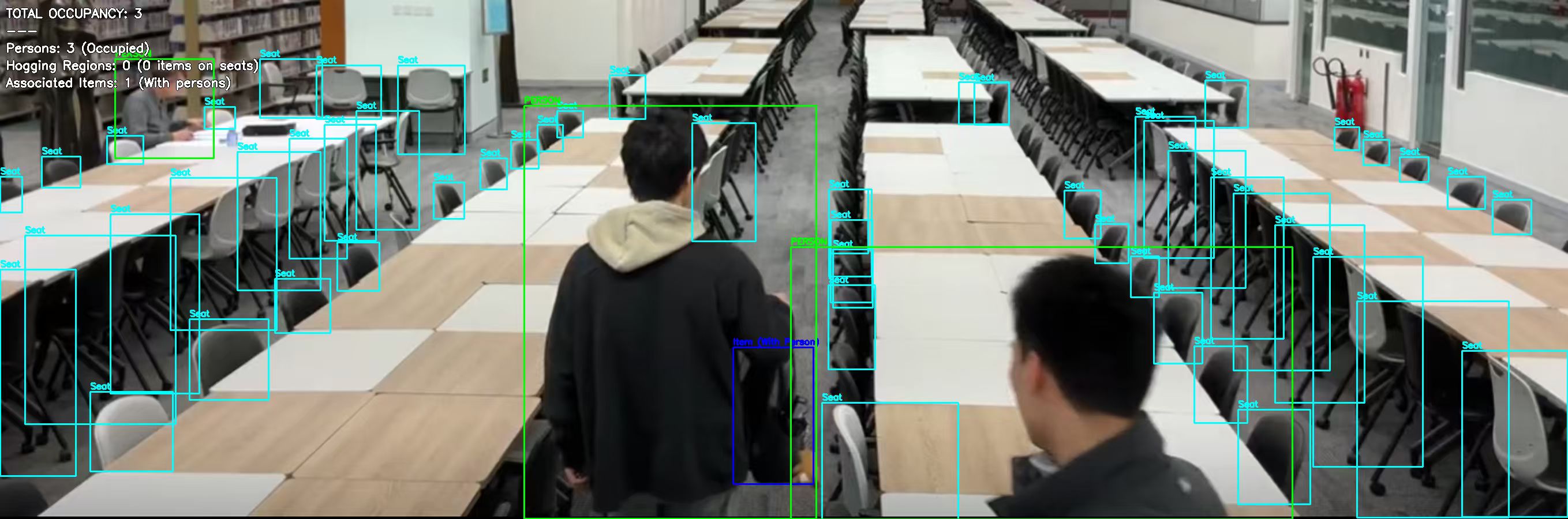
Occupancy detection pipeline
- Uses person/item detection and seat detection together.
- Counts people as occupied seats.
- Detects seat hogging when items occupy seats without nearby people.
- Aggregates camera-derived logs into area-level occupancy snapshots.
- Supports Redis windows, RabbitMQ queues, and local demo streams.
Architecture
Each subsystem can run independently or as a full local stack.
Flutter appHome, AI chat, booking, reservations, reports, notifications, and map viewer. |
Database and time-series storagePostgreSQL and TimescaleDB store users, reservations, occupancy logs, snapshots, and reports. |
FastAPI backendAuth, libraries, facilities, reservations, AI orchestration, occupancy, reports, and health checks. |
Cache and queue infrastructureRedis handles live occupancy cache. RabbitMQ stages camera frames and normalized stats events. |
AI agent servicePython service for natural-language booking sessions and confirmed reservation execution. |
CV and streaming toolsOpenCV, PyTorch, Ultralytics, MediaMTX, and demo streams support occupancy testing. |
Technology Stack
The implementation stack used in the completed project.
Mobile
Flutter, Dart, Provider, secure storage, local notifications, geolocator, permission handler, and Google Fonts.
Backend
FastAPI, SQLAlchemy, JWT authentication, APScheduler, modular routers, services, and OpenAPI documentation.
Data
PostgreSQL, TimescaleDB, occupancy logs, area snapshots, rollups, retention policies, and seed data scripts.
Infrastructure
Docker Compose, Redis, RabbitMQ, MediaMTX, RTSP, RTMP, WebRTC, and local video fixtures.
AI
Python AI service, OpenAI-compatible LLM API, session management, booking confirmation, and backend orchestration.
Computer vision
OpenCV, PyTorch, Ultralytics YOLO models, custom seat/person/item detection, training scripts, and test images.
Testing and Evidence
The project includes working code, fixtures, tests, and operational documentation.
Frontend tests
Repository, controller, provider, model parsing, network, notification, and widget tests are included.
API documentation
The backend exposes Swagger UI, ReDoc, health checks, and module-level API documentation.
Local full-stack setup
Docker Compose and environment examples support PostgreSQL, Redis, RabbitMQ, MediaMTX, backend, AI, and Flutter bring-up.
Deliverables
What this project delivers.
Mobile application
Cross-platform Flutter app for iOS and Android.
Backend API
Authenticated FastAPI service for booking, occupancy, AI, and reports.
AI agent
Natural-language booking assistant connected to the reservation system.
CV pipeline
Seat and occupancy detection with camera pipeline support.
© 2026 HKU Library Booking System with Real-time Space Monitoring for iOS and Android